A GoPro underwater camera tray gives you a larger grip and mounting points for a lighting rig. Our TR09 action camera tray combines two pivoting pistol grips with an included GoPro-style mount. This guide helps you choose a tray, compare arm options and decide between one video light and two. Before ordering, check the mounting interface and clearance of your exact underwater housing.
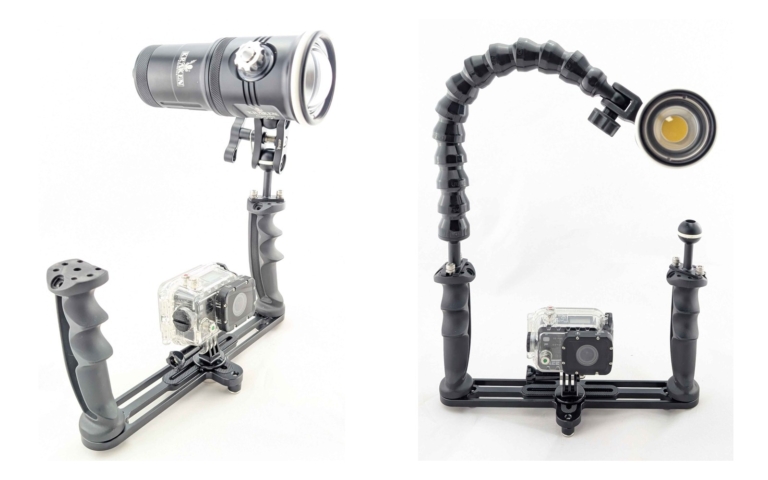
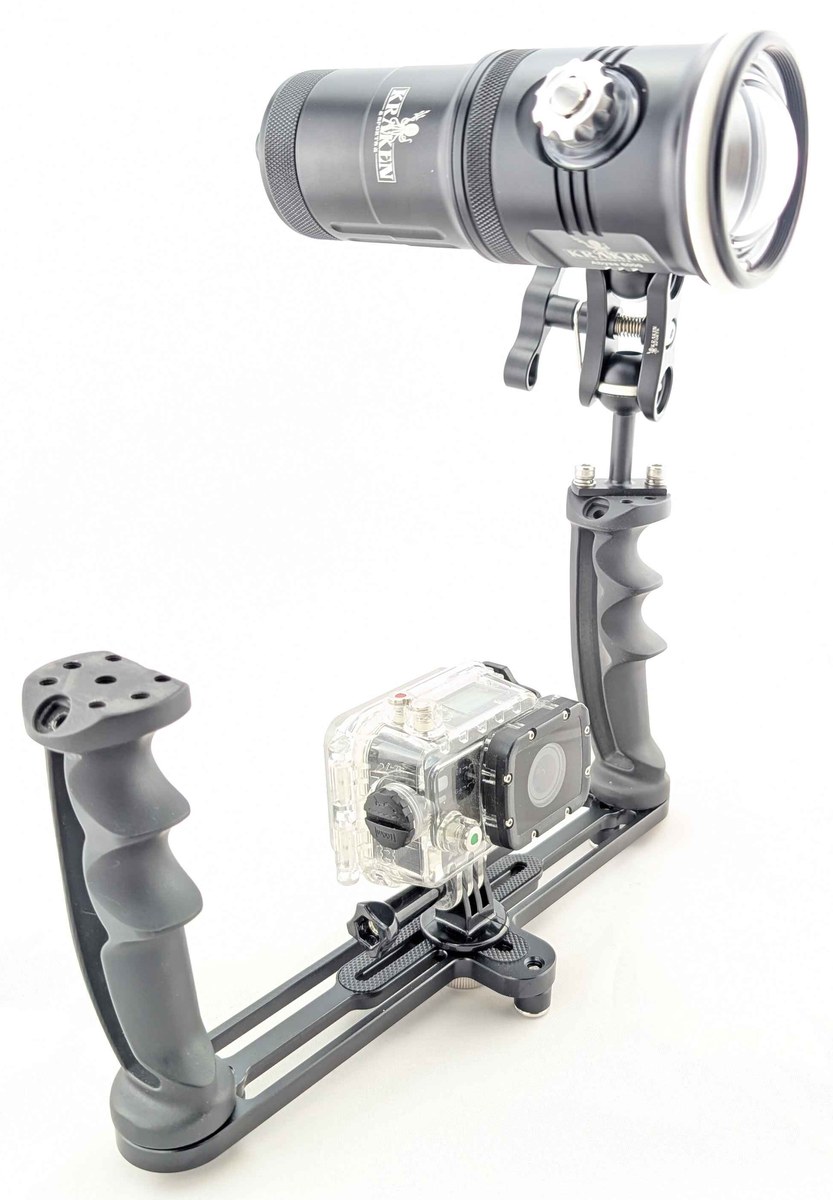
Photo examples: The photos above show two single-light action-camera rig examples: a compact ball-to-YS arm and clamp on the left, and a flexible arm on the right. Camera and underwater housing are shown for illustration and are not included in the lighting kit.
What a tray adds to your underwater camera rig
- Handling: A larger grip can make framing and two-handed control easier. A tray does not eliminate camera movement or replace good buoyancy control.
- Light mounting: A matched tray-and-arm arrangement gives you a way to position video lights beside the camera. Check the interfaces of the tray, arms and lights before combining parts.
- Rig balance: Housing, lights, arms and floats all affect underwater trim. Test the assembled rig in controlled water rather than assuming an aluminum tray makes every setup slightly negative.
- Control access: Check handle spacing and camera controls while wearing your usual dive gloves. Choose the arrangement that suits your housing and handling needs.
Tray Handle Styles: Pistol Grip vs. Straight Handle
This is the biggest decision you’ll make, and it affects everything about your dive experience:
Pistol Grip Handles
Pistol grip handles angle downward, letting your wrist sit in a natural, relaxed position — similar to holding a drill or a camera grip. Your hand wraps around the handle and “locks in” rather than constantly squeezing.
- Pros: Most comfortable over long dives; natural wrist angle reduces fatigue; better one-handed control if you need a free hand for buoyancy; feels intuitive for divers coming from camera photography
- Cons: Adds more height to the rig; bulkier in a dive bag
Straight / Foam-Grip Handles
These are cylindrical handles that extend straight up from the tray, typically with foam or rubber grips.
- Pros: Lower profile; lighter; simpler design; often cheaper
- Cons: Requires active gripping throughout the dive; can cause hand cramp on longer dives; less stable for one-handed operation
Our take: Try the grip angle and camera controls with your usual gloves. Our TR09 handles pivot inward or outward so you can adjust their angle; comfort depends on your hands, housing and complete rig.
Key Features to Look For
1. Tray width — match it to your housing
Our TR09 is designed for compact action-camera rigs. It measures 8.25 inches inside the handles and 10.75 inches across the outside, with pivoting pistol grips and a GoPro-style mount included. Confirm that your housing connects to the mount and clears the tray and handles.
The TR08 provides adjustable extensions from 8 to 11.25 inches for larger housing setups, with two ball mounts included. An action-camera housing may need a suitable adapter; check its attachment and clearance before choosing a larger tray.
Prefer a smaller, single-handle arrangement? The TR07 is an option for compact and action cameras. Its pictured flex arm and light are sold separately. Check your housing connection and control access rather than choosing by camera brand alone.
2. Adjustable Handle Position
Hands come in different sizes, and you might be wearing 3mm tropical gloves or 7mm cold-water mitts. Handles that pivot or slide along the tray let you dial in the perfect grip width. Fixed handles force you to adapt to them.
3. Ball Mounts for Lights
Each handle should have a 1-inch ball mount (or a mounting point for one). This is the standard in underwater photography — it lets you attach arm-and-clamp systems for video lights or strobes. Without ball mounts, you’re limited to flex arms only.
4. GoPro Mount vs. 1/4-20 Screw
Action camera trays should include a standard GoPro mount — the same style you’re already familiar with from GoPro accessories. The TR09 comes with one built in. Larger camera housings use the standard 1/4-20 tripod screw. If you want to mount a GoPro on a tray designed for larger housings (like the TR08), use a suitable tripod-to-GoPro adapter and check your housing clearance.
5. Material: Anodized Aluminum
Choose a tray designed for underwater use, with a mounting arrangement that supports your housing and lights. Compare the actual dimensions, material and care requirements rather than assuming that every tray has the same weight or underwater balance. Rinse your rig after diving and follow its care instructions.
6. Base Mounting Threads
Our TR09 includes three 1/4-20 threads on the underside. Before attaching accessories or a topside tripod, check the connection, clearance and support for the weight of the complete rig. Other trays may use a different arrangement.
Lighting Integration: The Real Reason Trays Matter
White video lights add illumination to nearby subjects and can reveal colours that fade as light travels through water. For action-camera video, use continuous video lights rather than assuming the camera can trigger a strobe. Lighting results depend on distance, clarity, exposure and positioning; a tray also improves handling when you choose to shoot with ambient light.
Flex Arms vs. Ball-and-Clamp Arms
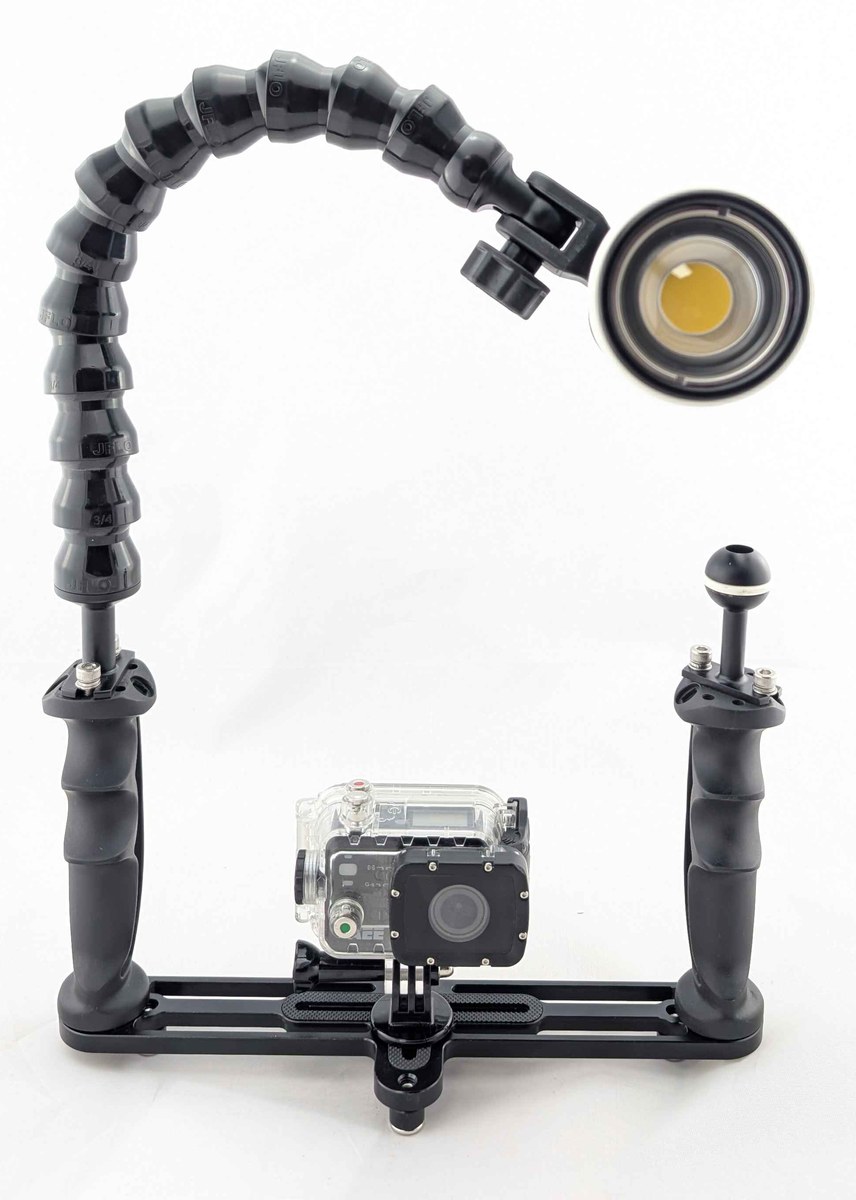
Flex arms (like Loc-Line style) bend and hold their position — no knobs to tighten. They’re affordable, simple, and popular with GoPro shooters who want to add a video light without complexity. The arm stays roughly where you put it, which works well for straightforward lighting angles.
Ball-and-clamp arms use 1-inch ball joints and clamps. Properly tightened clamps offer firmer positioning than flexible arms, but holding power depends on the light load, clamp condition and current. Choose an arm system that supports your lights and test it before diving.
Which to choose? It’s personal preference. Flex arms are simpler and cheaper — great if you set your light angle once and don’t mind minor drift. Ball-and-clamp can give you firmer positioning when correctly matched and tightened and works equally well for single-light or dual-light setups. Many divers start with flex arms and upgrade to ball-and-clamp later; others go straight to rigid arms because they want that locked-in confidence from dive one.
How Many Lights Do You Need?
- One video light: Good for close-up and macro. The light will be off-center, creating slight shadows, but it’s the lightest and cheapest setup.
- Two video lights: Even, wide illumination — the standard for wide-angle underwater video. Can reduce shadows and backscatter when positioned carefully. Requires a dual-handle tray.
- Strobes (for compatible still cameras): Flash can freeze motion, but it requires a camera and housing with a supported trigger. Do not assume a GoPro can trigger an underwater strobe; use continuous video lights for the action-camera rig described here.
Buoyancy: Getting Your Rig Right
A heavy rig can tire your arms; an overly buoyant rig can be awkward to hold down. Aim for a balance you can comfortably control, and test the complete housing, lights, arms and floats in controlled water before diving. Secure the rig appropriately rather than releasing it to test its balance over a reef.
The buoyancy of a complete rig depends on its housing, tray, arms and lights. For Abyss 6000 and Hydra 5000, use the dedicated KR-FB09 float (250g of buoyancy). KR-FB04 fits Hydra 10000 and Spectrum 10000. Do not assume a collar fits every larger light. Match the float to the exact model and test the full rig in water.
GoPro-Specific Considerations
Housing Choices
Use a dive housing matched to your exact camera model and planned depth. Check the manufacturer’s depth rating, mounting interface and accessory compatibility rather than assuming all GoPros or third-party housings are the same. Housing is not included in the Kraken lighting kit.
Filters
Water absorbs colours differently as light travels through it; the effect depends on depth, visibility and distance. A housing-compatible red or magenta filter can change colour balance in suitable ambient-light conditions, but it also removes light. Usually remove a colour-correction filter when using white video lights on nearby subjects. Check filter clearance with your exact housing and tray.
Wide-Angle Lenses
If you want to add a wet lens, choose one specifically compatible with your camera, housing and mount. Check the lens maker’s supported field of view and camera settings; not every lens improves every GoPro setup. Also check clearance with the tray and handles. Working closer to a subject reduces the amount of water between it and the camera.
Choose your GoPro tray and lighting setup
Start with the tray
The TR09 gives compact action-camera rigs two pivoting pistol grips and an included GoPro-style mount. If you already own lights, check their mounts and your arm system before adding parts. Camera and housing fit depends on the exact mounting interface and clearance.
Choose a matched Abyss 6000 lighting kit
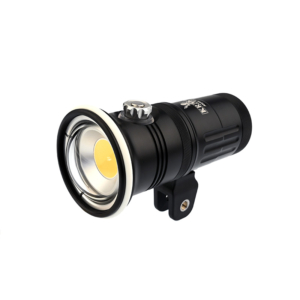
Our Abyss 6000 Action Camera Lighting Kit pairs a TR09 tray with one or two Abyss 6000 video lights. Choose BM3 arms with clamps or FLEX01 flexible arms. Each light provides up to 6,000 lumens of white flood output; useful coverage depends on your subject distance, water clarity and camera settings.
| Configuration | Tray and lights | Arm hardware |
|---|---|---|
| BM3 / Single light | 1 TR09 and 1 Abyss 6000 | 1 KR-BM3 3-inch ball-to-YS arm and 1 KR-CL clamp |
| BM3 / Dual light | 1 TR09 and 2 Abyss 6000 lights | 2 KR-BM3 3-inch ball-to-YS arms and 2 KR-CL clamps |
| FLEX01 / Single light | 1 TR09 and 1 Abyss 6000 | 1 KR-FLEX01 flexible arm |
| FLEX01 / Dual light | 1 TR09 and 2 Abyss 6000 lights | 2 KR-FLEX01 flexible arms |
Each kit includes one tray. The TR09 includes two handles, two ball mounts and the GoPro-style camera mount. Each Abyss 6000 includes its standard battery, USB-C PD charger, YS mount, ball mount and spare O-rings. FLEX01 configurations use flexible arms instead of the tray-side ball-and-clamp arrangement; the supplied tray ball mounts are still included.
Camera and underwater housing are not included. Confirm your housing’s mounting connection and clearance; a model-specific adapter may be needed. Follow the housing’s depth limit as well as the light’s. Setup photos show illustrative single-light arrangements, not every configuration.
One light or two?
One light keeps the rig more compact and can suit nearby subjects. Two independently aimed lights give you coverage from both sides. A second light does not automatically remove shadows or backscatter: adjust position and brightness for the scene.
Balance the complete rig
The KR-FB09 float fits Abyss 6000 and Hydra 5000 and provides 250g of buoyancy. It is an optional accessory, not a listed component of the lighting kit. Check the trim of the whole assembled rig in water; do not assume every float fits every light.
For custom setups, choose arms, mounts and buoyancy accessories for the exact lights you own. Follow the linked product pages for current prices, options and availability. Canadian storefront pricing converts automatically, so check your chosen configuration for the current displayed price.
Advanced: Higher Output and a Balanced Rig
For a higher-output custom rig, consider two Abyss 10000 lights on TR09 or TR08 with a suitable arm-and-clamp system. Use Abyss 20000 only when the extra output justifies the larger rig. Larger Hydras remain valid video options when you also want colour or fluorescence modes.
Common Mistakes to Avoid
- Buying a tray that’s too wide: Standard mirrorless trays (12″+) make GoPro rigs top-heavy and awkward. A large, heavy tray defeats the whole point of using a compact action camera. Get a compact action camera tray sized for your camera.
- Expecting lights to reach every scene: Video lights add illumination to nearby subjects. For scenes beyond their useful range, plan an ambient-light workflow. A tray still provides handling benefits without lights.
- Choosing the wrong arm type for your style: Flex arms are simpler and cheaper, but they can drift during a dive. If you want your light to stay exactly where you point it — especially in current — ball-and-clamp arms are worth the extra cost. Either works for a single-light or dual-light setup; it comes down to whether you value simplicity or rock-solid lock-down.
- Ignoring light position: Aim and position lights to illuminate the subject without unnecessarily lighting suspended particles between the lens and subject. Adjust for visibility and framing. The right spacing depends on your arm system and scene; there is no single distance that suits every rig.
- Ignoring buoyancy: An unbalanced rig causes fatigue and makes steady filming harder. Match collars or float arms to your exact light and check trim in a pool. Do not assume one float model fits all Abyss lights.
- Forgetting gloves: Handling a bare GoPro with gloves is nearly impossible — the housing is too small and slippery to grip. Make sure your handle spacing is wide enough and the grip is accessible with mitts on. Practise accessing camera controls with gloves; the TR09’s pistol grip does not provide a remote record trigger.
- Trusting lumen specs at face value: Not all lumen ratings are equal. Some manufacturers list theoretical max output; others list actual measured output. Compare real-world beam tests, not just the number on the box.
FAQ
Do I need a tray for my GoPro underwater?
A tray is optional, but it gives you a larger grip and a place to build a matched lighting setup. It can help with handling; it does not eliminate hand-shake or guarantee smooth footage. Check camera controls and rig balance before the dive.
Single or dual handle tray?
Dual handles support two-handed handling and mounting lights on both sides. A single-handle tray can suit a more compact arrangement or one-handed use. Compare our TR09 dual-handle tray with the TR07 single-handle tray, and check housing fit and control access.
Can I use a tray with any GoPro model?
Check your exact camera and housing. TR09 includes a GoPro-style mount; mounting compatibility depends on the housing interface and clearance, not just the camera brand. A TR08 may need an appropriate camera adapter. Confirm the connection before purchase.
What’s the difference between the Kraken TR09 and TR08?
The TR09 is compact (8.25″ inner width) with pivoting pistol grips and a built-in GoPro mount — built specifically for action cameras. The TR08 is wider (8–11.25″ adjustable) for mirrorless and DSLR housings, also with pistol grips. If you’re shooting GoPro, the TR09 is the natural fit. If you might upgrade to a mirrorless rig later, the TR08 gives you room to grow — just add a tripod-to-GoPro adapter to mount your GoPro on it.
Do I need filters if I have video lights?
For nearby subjects, video lights add full-spectrum light; you usually remove the colour-correction filter when shooting with those lights. For ambient-light scenes outside light range, a housing-compatible filter can help in suitable conditions, but it removes light and is not mandatory. Check white balance and avoid mixing filtered ambient settings blindly with lit close-ups.
Can I mount my GoPro on a larger housing tray?
A suitable tripod-to-GoPro adapter may let you connect an action-camera housing to a larger tray such as the TR08. Check the adapter, mounting connection and housing clearance. The TR09 includes a GoPro-style mount, but that does not establish fit for every housing.
How do I travel with a tray setup?
Disassemble the rig as appropriate for your tray and pack the housing and lights securely. Check your light battery’s watt-hour label and airline rules before travel; protect terminals on removed batteries and prevent accidental activation. Do not assume a tray weight that is not listed in the current catalog.
How do I clip off my rig when I need my hands free?
When you need both hands for a safety stop, inflator, or just to rest, a Kraken Quick Release Coil Lanyard clipped to your BCD D-ring is the easiest solution. The coil extends when you’re shooting and retracts to stay out of the way when your hands are free. The quick-release snap lets you detach in one motion. Available in four colours so you can spot your gear on a crowded dive boat. The key: always have a clip — a tray with a GoPro and lights is an expensive piece of gear to drop.
Two lights or one?
Two independently aimed lights provide more positioning options and coverage from both sides. One light is a more compact starting point for nearby subjects. Choose for your subject, handling preferences and budget, then adjust position and brightness for the visibility. Neither arrangement guarantees shadow-free or backscatter-free footage.
How far will my video lights reach?
Useful light range depends on water clarity, power, beam, camera settings and subject reflectivity. Work close to your subject and check exposure. For scenes beyond useful light range, use an ambient-light workflow; a compatible filter is optional and cannot replace missing illumination.